



Family Feud: Official iPhone Game Show Experience
Overview
The official Family Feud mobile adaptation brings the beloved television game show to iOS devices, offering an immersive experience that mirrors the original format. Developed by Ludia, the app captures the essence of the classic quiz competition, where players lead their family against another in a series of head-to-head rounds. The game aims to deliver entertainment through accurate representation of the show’s structure, including timed responses, buzz-in mechanics, and the climactic Fast Money round.
Designed for casual and family-oriented audiences, it serves as a digital recreation of the show’s interactive spirit. The app supports single-player progression and multiplayer interaction through Party Mode, enabling users to challenge friends directly on their iPhone. The inclusion of John O'Hurley’s voice as the host adds authenticity, reinforcing the show’s nostalgic appeal.
While the developer did not specify real-world usage scenarios beyond gameplay, the app is intended for users seeking a familiar, engaging quiz experience on mobile. Its presence on iOS suggests a focus on touchscreen interaction and intuitive controls suitable for quick sessions.
Key Features & Capabilities
- Official Game Show Format: Accurate recreation of the Family Feud television show structure, including four rounds per episode and the Fast Money finale.
- Hosted by John O'Hurley: The voice of the original American host is featured, enhancing the authenticity of the experience.
- Single-Player Mode: Players progress through increasingly challenging opponents, simulating the show’s escalating difficulty.
- Party Mode (Two-Player): Enables face-to-face competition between two users on the same device, ideal for family gatherings or casual play.
- Intelligent Word Suggestions: Assists players in quickly entering answers that match common responses, improving gameplay flow.
- Timed Responses: Fifteen-second windows for answering, matching the original show’s pace and tension.
These features collectively support both solo entertainment and social interaction. In single-player mode, users experience a progression system where each victory unlocks a tougher opponent, encouraging continued play. Party Mode leverages the iPhone’s multi-touch interface to allow two players to take turns on one device, replicating the show’s competitive dynamic.
The word suggestion system helps maintain engagement by reducing input friction, especially for players unsure of popular answers. The timed rounds ensure a fast-paced environment, mirroring the original show’s energy. While the developer did not provide performance benchmarks, the app’s design suggests optimized responsiveness for iOS devices.
The integration of licensed content, including voice and set design, indicates a commitment to fidelity, making it a go-to choice for fans of the franchise.
User Interface, Workflow & Performance
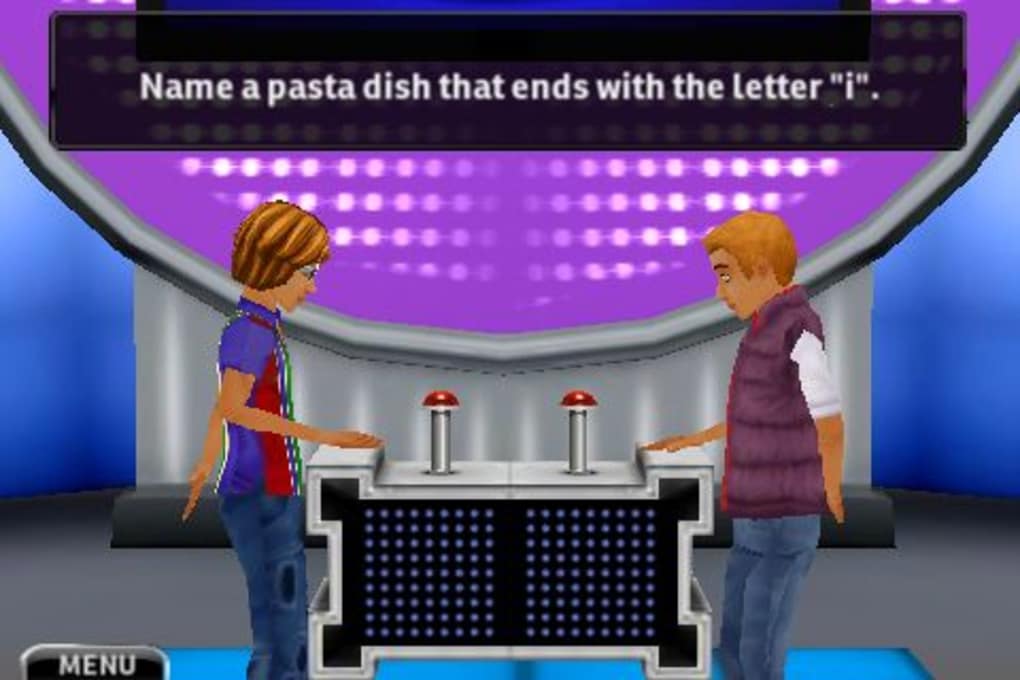
The user interface is structured around the original game show layout, with a clean, visually consistent design that reflects the set’s aesthetic. Navigation is straightforward, guiding users through menus, game modes, and settings with minimal friction. The workflow begins with selecting a mode—single-player or Party Mode—followed by prompt setup and gameplay initiation.
During rounds, the interface highlights the buzz-in button and response field, ensuring clear visibility and interaction. The touchscreen controls are responsive, allowing players to tap to answer or pass. However, performance observations are based on general software behavior patterns, as exact resource usage details were not specified.
The developer did not disclose CPU or RAM consumption metrics. Stability reports are limited, though user feedback indicates occasional lag and crashes during gameplay. These issues may affect the overall experience, particularly in longer sessions or during Fast Money rounds.
Despite this, the app maintains a functional interface and continues to load and run on supported devices. The UI remains consistent across different screen sizes, suggesting adaptive layout handling. Overall, the workflow is intuitive, but performance inconsistencies could hinder seamless play.
Compatibility & System Requirements
Family Feud is designed for iOS devices, with the latest version available as of May 14, 2024. The app requires 150.3 MB of storage space for installation. Platform compatibility information is limited to iOS, but specific device models or minimum OS versions were not listed.
The developer did not provide additional system requirements, so users are advised to ensure their device meets standard iOS app compatibility standards. Hardware requirements were not specified. Installation is expected to follow standard iOS procedures, with updates delivered through the App Store.
The app’s size suggests it includes high-quality audio, graphics, and video assets to support the show’s visual and auditory fidelity. While no compatibility details beyond the OS were shared, the app is intended for use on iPhone devices with touch-enabled screens. Users should verify their device’s compatibility through the App Store before downloading.
Pros and Cons
Pros
- Authentic recreation of the classic Family Feud TV show format
- Official licensing with John O'Hurley’s voice and original set design
- Engaging single-player progression with increasing difficulty
- Interactive Party Mode for local two-player competition
- Smart word suggestions improve answer entry speed and accuracy
- Free to download and play, with no upfront cost
Cons
- Occasional game lag and crashes reported by users
- Limited system requirements and compatibility details provided
- Performance optimization not clearly addressed
- No information on background resource usage
- Dependent on iOS ecosystem, not available on other platforms
FAQ Section
Is Family Feud available for free on iPhone?
Yes, the app is free to download and play on iOS devices. There are no upfront costs, though in-app purchases may be available.
Can I play Family Feud with a friend on the same device?
Yes, the app includes Party Mode, which allows two players to compete directly on one iPhone.
Does the game require an internet connection?
While the app can be used offline for single-player mode, certain features like updates and leaderboards may require an internet connection.
Is Family Feud safe to download?
Yes, the app is distributed through the official App Store and is verified by Apple. It is a secure, official release from Ludia.
How often is the game updated?
Updates are released periodically, with the latest version available as of May 14, 2024. Bug fixes and improvements are included in each update.
Final Thoughts + CTA
Family Feud delivers a compelling and faithful adaptation of the iconic game show, offering an engaging experience for fans and casual players alike. The integration of John O'Hurley’s voice, accurate gameplay mechanics, and the inclusion of Party Mode make it a standout choice among iOS trivia games. While performance issues such as lag and crashes detract from the experience, the core gameplay remains strong and enjoyable.
The free pricing model increases accessibility, and the app’s design supports both solo play and social interaction. For users seeking a nostalgic, interactive quiz experience on iPhone, this app is highly recommended. Despite minor technical flaws, its authenticity and entertainment value outweigh the drawbacks.
Download Family Feud now and bring the excitement of the classic TV show into your home.







